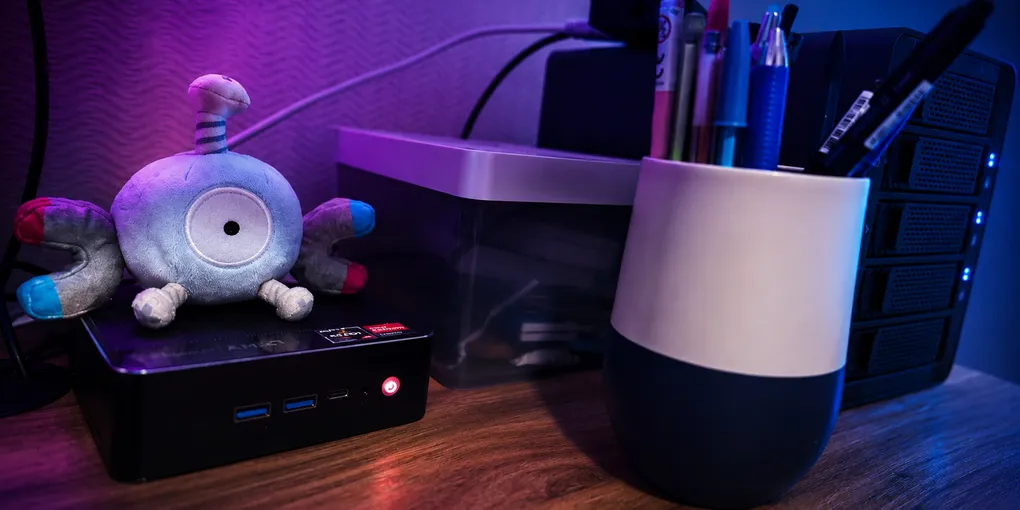
Why I Started My Own Homelab: Creating “deoxys”
For a long time, my “server” was just my main gaming/work PC pretending to be infrastructure. It ran Plex, held a bunch of files, and stayed on way more than it should because turning it off also meant turning off parts of my digital life.
I have always been a technology enthusiast. I have been building websites and apps since I can remember, from Blogger to React. And I always liked messing with hardware and servers, and I love learning as much as I can about technology, programming, and the internet in general. I also strongly believe in self-hosting and have always wanted to host my own stuff, but I had never found the right format for it.
So, in late 2025, when I stumbled into homelab videos and subreddits, just seeing the word “homelab” lit a fire in me. It felt like such a comfortable place: a community of like-minded people who spent too much of their time tinkering with servers and all their possibilities.
How come I had never seen this word before? Where was this community, all this time? I have messed with Arduino, webdev, and even had a Raspberry Pi 4 for years, and had even used it to run an Ethereum client a few years back. But for some reason, I never thought of “tinkering with my own server at home, in a separate always-on PC”, and all the good that could come from that.
So I went down the rabbit hole.
My first goal was simple: move Plex out of my main PC so I could finally turn that machine off at night. But of course, I knew from the beginning this was not just about a media server, and I didn’t want it to be. This homelab would become a place to learn Linux, Docker, networking, self-hosting, local-first tools, and eventually AI agents running on my own infrastructure.
Starting out: Hardware
Fortunately, I have quite a few PCs at home. Being a game developer, having different hardware at home is natural to me, and it makes me need Windows for a lot of things. So I escape to other platforms when I can, while keeping Windows available. At home, other than my Desktop and my MacBook, I had an old Dell laptop, a Raspberry Pi 4, and a Beelink Mini PC available.
I chose the best-suited hardware from that stack: a Beelink Mini PC with a Ryzen 7. It has a Vega graphics card and could easily be a simple work computer. I had even used it before as a machine to play Steam games on my TV, but its Wi-Fi 5 didn’t help and I gave up. It is not the most power-efficient option for a homelab, but it is much more powerful than a Raspberry Pi and can handle a lot of services running at the same time.
Linux had also been orbiting my life for a very long time. In the early 2000s, I used Live CDs like Ubuntu, Mint, and especially Slax as recovery tools for broken Windows machines. The first time I installed Linux, a school friend invited me to his house just for that, with the whole installation guide printed on paper. Later, I dual-booted Windows and Mint, and I remember being scolded by an angry father after he tried to use my PC and couldn’t do anything. And in 2021, I tried to daily-drive Manjaro on a new machine with two 4K monitors and an RTX 3070, only to give up after too many NVIDIA issues and too many Stack Overflow tabs.
So when I started the homelab, Linux didn’t feel completely new. It felt more like returning to an old thread I left behind, but this time with a real reason, better tools, and AI helping me through the parts that used to mean reading dozens of obscure forum posts. But that will be a story for another post!
For the homelab and my goal of replacing my main PC as my media server, I would also need external storage. The Beelink does not have a SATA connection, so I had to connect extra hard drives through USB. My other option was to buy a NAS, but I did not want to go that route. I read a lot of Reddit posts about people debating the option, but in the end, I wanted to build my own stack and learn from it. Also worth noting: NAS is a much more expensive route, and very inaccessible where I live (Brazil).
So I decided to use a DAS. That way, I could reuse some old hard drives I already had at home, and it would be more reliable than regular USB external drives.
My media server already used a 4 TB drive, and that drive was basically full with media and backup files. So I needed a new drive anyway, even if I only moved everything as-is. Since this was early 2026, with the RAMpocalypse in full swing, I knew it would take me a while to get a good DAS and a big new HDD.
I ended up choosing a DAS from AliExpress, one of the few options that shipped from my country without extra taxes, with USB-C and USB 3.0 speeds. For the drive, I got a 16 TB IronWolf Pro.
Bootstrapping: Deciding on the OS
First, I knew I wanted a widely used Linux distro. I wanted the setup to be portable enough to run on other hardware later if I upgraded, and I wanted something with plenty of documentation and troubleshooting material online.
One thing that guided my choice was that I had already experimented with Linux on this Beelink a few months earlier. I tried installing Arch Linux on it to test Hyprland, and it did not go well. The video drivers were troublesome, Wayland did not run properly, and the machine needed a lot of custom configuration.
So, for the homelab, I decided to go the full server route, and I am glad I did. I installed Ubuntu Server LTS. It was a deliberate choice to not even have the option of a GUI, and honestly, I did not miss it once. The only times I connected a monitor were during installation and once when the machine got stuck during boot and I could not SSH into it.
With Ubuntu, almost everything worked out of the box. I still had one very funny issue, though: because of my ignorance, and I cannot even remember what led me to it, I let the system boot with acpi=off.
I used the server like that for months. 💦
Only when I tried installing something heavier and wanted to check the impact did I notice that the kernel thought there was only one CPU thread… My Beelink has an AMD Ryzen 7 3750H with 4 cores and 8 threads. So my whole Docker setup had been running with one eighth of the CPU available.
Now that was a surprise, lol. But well, I learned something, had a laugh, and now I will be much more careful with future installations.
And with that, with Ubuntu Server running smoothly on the Beelink, connected to my network, and accessible through SSH, deoxys was born 🔥
Architecture: Folders, Docker Compose files, etc
I started tinkering with the server before I even got the new HDD and DAS. I wanted to make the homelab useful as a learning place even before moving my media library. I wanted to set up local DNS with AdGuard Home and run a few simple self-hosted apps, so I had some architectural decisions to make.
I decided on a Docker-only architecture and to connect everything locally through Tailscale. This was the simplest setup to start with, and it meant my self-hosted apps were accessible from anywhere, as long as I was connected to my tailnet.
I had only brief experience with Docker before this, but I think it was the right choice. Docker gave me almost zero dependency issues and made maintenance much simpler once I started figuring out the basics. The biggest friction was not being able to easily run terminal commands from inside app containers without long docker exec commands, and that is something I am still improving.
Tailscale was also a great fit for what I wanted at the beginning: self-host some apps, access them from my other devices, and avoid spending too much time on public networking before I was ready. I still have not tried a reverse proxy, and that is on my roadmap for learning. But in the short term, Tailscale is so simple and secure that I may keep using it for many things even after I learn the more advanced setup. It works without opening ports on my network, which lets me worry a bit less about security while I am still learning.
For my folder structure, I started with this:
/homelab
  /apps     -> repo clones, app code, and installation files
  /compose  -> Docker Compose files, separated by function
  /data     -> app-created data: configs, databases, and persistent files
Because I wanted to experiment with many kinds of apps, with different levels of importance for my infrastructure, I separated them into different Compose files. The separation is based on function, or on the function I give them, so this is very personal. As the homelab expanded, I added new Compose files and moved apps around when the structure started to make more sense.
These were my compose files when I started:
core.yml— infrastructure apps, like AdGuard Homemedia.yml— Plex, Jellyfin, Komga, Suwayomi, and related servicesagents.yml— agents like OpenClaw and Hermeswebapps.yml— custom self-hosted web apps made by me and accessed through Tailscale
Nowadays, I have a few more categories because I added more apps and created more uses for the homelab. But I think these are good examples to show the structure.
This has been useful for keeping each file short, instead of having one monolithic compose.yml, and for separating services when I write scripts. I can prioritize uptime for everything that is core infrastructure, while not caring as much if something from webapps.yml is down, since it will not affect my general network.
Bottom line: Has it been worth it?
Yes.
Starting a homelab has been incredibly rewarding, and I have been learning a lot. I wish I had started earlier. My electricity bill is higher, and I have definitely spent too much time on it, but I am having a lot of fun.
I have also started using the homelab for more and more parts of my digital life. I will write more about that later, but here is the short version:
- I moved backups for some non-critical files to my DAS. Critical documents are still backed up in the cloud.
- I started using Obsidian for personal notes and writing, synced through self-hosted LiveSync on
deoxys. - I have been building custom tools with AI and experimenting with my personal agent setup using OpenClaw.
- I started using Nextcloud to access files remotely.
- I have been reading manga with Suwayomi and Komga.
The homelab started as a way to move Plex out of my main PC, but it became much more than that. It is now the infrastructure layer for my notes, my media, my agents, my experiments, and the small personal tools I want to build.
More than anything, it reminded me how good it feels to understand the systems I use, to shape them around my own needs, and to keep following a technical rabbit hole just because the journey itself is fun.